

TLDR:
- The "move fast and break things" playbook backfires with AI agents. Errors compound.
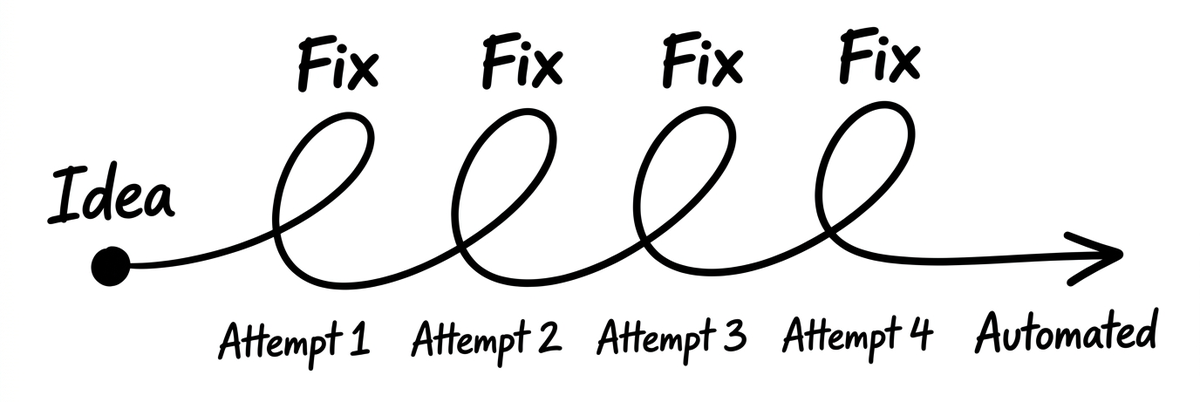
- The framework that actually works: idea, attempt, fix, repeat, automate.
- Pick ONE workflow. Perfect it before starting the next one.
- Skill files are self-healing SOPs. When something breaks, describe the problem and the AI fixes itself.
- A 4-hour investment in one workflow compounds into permanent, sub-1-hour automation.
Somewhere around 2012, "move fast and break things" became the unofficial motto of anyone building anything on the internet. Ship it. Patch it later. Speed wins.
That advice made sense when you were pushing code to a website and could roll back a bad deploy before lunch. It makes zero sense when you're building AI agent workflows.
In an agentic system, errors don't sit there waiting to be fixed. They compound. One bad instruction cascades into the next task, which feeds garbage into the task after that, which produces an output so far from what you wanted that you're better off starting over. The faster you moved, the more you have to undo.
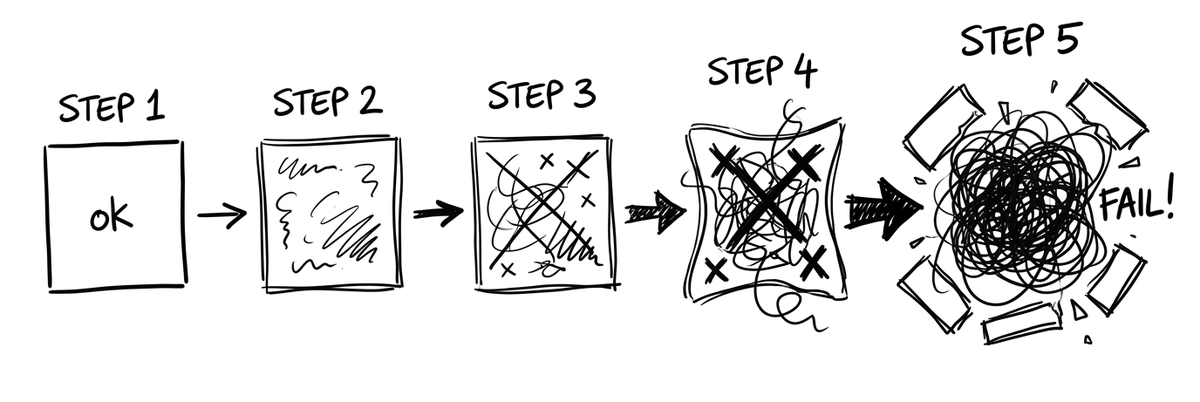
The people getting real, repeatable results from AI agents are doing something that feels counterintuitive in a world obsessed with speed. They're slowing down. Deliberately.
Why "Move Fast and Break Things" Backfires with AI
The AI hype cycle has a speed problem.
Every week there's a new tool, a new model, a new "everything just changed" post on LinkedIn. The pressure to keep up is relentless. And for founders and marketers who are already drowning in channels and tactics, that pressure triggers exactly the wrong response: try everything, commit to nothing, sprint from shiny object to shiny object.
Sound familiar? If your to-do list multiplies faster than your revenue, you're living this.
The chatbot era (think ChatGPT circa early 2023) actually rewarded speed. You typed a prompt, got an answer, moved on. Quick exchanges. Low stakes. If the output was wrong, you just re-prompted. No harm done.
AI agents are different animals entirely. Tools like Claude Cowork don't just answer questions. They work inside your files and folders. They execute multi-step processes. They connect to your email, your calendar, your Slack. They make decisions based on context you've given them.
When an agent gets something wrong on step two of a twelve-step workflow, steps three through twelve inherit that mistake. Speed didn't help you. Speed buried you.The Idea-Attempt-Fix Loop
So what actually works?
During a recent live training on agentic workflows, I walked through the framework I use every time I build a new AI workflow. It's not complicated. It's just disciplined.
Step 1: Idea. Start with a clear picture of what you want the workflow to produce. Not a vague wish. A specific output. "I want 15 story candidates for this week's newsletter, each with a headline, source link, publication date, and a one-sentence summary." The clearer you describe the finish line, the fewer laps you'll run getting there.
Step 2: Attempt. Tell the AI what you want. Give it as much context as you can. (Sometimes that's a lot. Sometimes it's surprisingly little. Both are fine.) Let it run.
Step 3: Fix. This is the part most people skip, and it's the part that matters most. Review the output carefully. Not "glance at it and say looks good." Actually read it. Then describe, in plain language, what's wrong. "The headlines are too generic. I need more specificity about what happened, not just the topic." "The dates are wrong on three of these. Verify publication dates by checking the actual article page."
The AI doesn't need you to fix the code or edit the config file. It needs you to describe the gap between what you got and what you wanted. Then it fixes itself.
Step 4: Repeat. Run it again. Review again. Fix again. Each cycle gets tighter. The first attempt might be 60% right. The second, 80%. By the fourth or fifth pass, you're looking at output that's 95% ready to use, with only the most nuanced judgment calls left for you.
Step 5: Automate. Once the workflow consistently produces what you want, tell the AI to codify it. It writes its own instructions (called a skill file) based on everything you just taught it. Now that workflow runs the same way every time, without you re-explaining anything.
Idea, attempt, fix, repeat, automate. Five steps. No code. No technical background required. Just patience and specificity.
Why "Pick One Workflow" Is the Hardest (and Most Important) Advice
Here's where most people trip: they hear about all the things AI agents can do and try to build five workflows at once. Newsletter automation AND LinkedIn content AND email sequences AND customer service AND morning briefings. All in the first week.
This is the entrepreneurial equivalent of joining a gym and trying to bench press, run a 5K, and do hot yoga on day one. You're sore everywhere and seeing results nowhere.
Pick one workflow. One.
Start with something you already do every single week. Something repetitive. Something where the output is relatively easy to evaluate. A morning routine that pulls your calendar, weather, and top priorities. A research process that finds stories for your newsletter. A draft email that follows a consistent format.
The reason "one workflow" matters so much is that the real learning happens in the fix cycles. You're not just building a workflow. You're training yourself to communicate with an AI agent. You're learning what level of specificity produces good output. You're developing an intuition for where the AI needs more context and where it's fine on its own.
That skill transfers to every workflow you build afterward. The first one takes the longest. Every one after that takes a fraction of the time. (Think of it like learning to drive stick shift. Brutal at first. Then you stop thinking about it entirely.)
The Self-Healing Skill File
The concept that trips people up most is this: you don't write the instructions. The AI does.
Skill files are essentially SOPs (Standard Operating Procedures) that the AI creates based on what you taught it during the idea-attempt-fix cycles. They live as plain text files in your folder system. They tell the AI exactly how to perform a specific task: what to search for, what format to use, what voice to write in, what quality checks to run.
And here's the thing that makes the whole system click: skill files are self-healing.
When a workflow produces something that's not quite right, you don't need to open a file and edit code. You say "the 'Why It Matters' section is too long and too generic. Keep it to two sentences max and make it specific to what this means for small business marketers." The AI updates its own skill file. Next time it runs, that fix is baked in.
Over time, your skill files accumulate dozens of small corrections. Each one makes the output tighter, more specific, more "you." After a few weeks, the AI produces work that sounds like it came from someone who's been on your team for months. Because, in a real sense, it has. It learned by being corrected, just like any good employee.
That's the compound effect people miss. You're not starting from scratch every session. You're picking up where you left off, with an AI that remembers every preference, every correction, every "no, more like this" you've ever given it.
From 4 Hours to 1: The Compounding Returns of Patience
Real example. During the training, I showed a blog creation workflow that a theCLICK Pro member had built that same morning. It produces a complete, formatted article from a meeting transcript: TLDR section, drop caps, pull quotes, comparison tables, flowcharts, cross-links, SEO schema markup. The works.
The first iteration took 4 hours.
That sounds like a lot. Here's what happened next: he told the AI to codify the entire process into a skill file. That took 30 minutes. The next article he produces using that skill? Estimated time: 1 hour. The one after that? Less.
Four hours invested once. One hour (or less) forever after. For a complete, publication-ready article with formatting and enrichments that would take a human writer plus a designer plus an SEO specialist the better part of a day.
Now compare that to "moving fast." You skip the fix cycles and crank out a mediocre article in 45 minutes. Then another mediocre article in 45 minutes. Then another. A pile of average content that does nothing for your authority or your search rankings. And average content, by the way, is now a complete waste of time. When everyone has access to AI, average is the floor, not the ceiling.
The slow path produces one excellent piece and a system that keeps producing excellent pieces. The fast path produces a lot of forgettable ones.
What "Automated" Actually Looks Like
The endgame isn't "type prompts faster." The endgame is workflows that run themselves.
Once you've perfected a workflow and codified it as a skill, you can wire it into a routine. Routines are sequences that trigger on a schedule or on command. My morning routine, for example, runs before I've finished my first cup of coffee. It checks the weather, pulls my calendar, scans the news for stories that match my newsletter criteria, reviews my Slack messages, checks my email, looks at webinar registrations, and gives me a prioritized briefing of what needs my attention today.
I didn't build that in a weekend. I built it one piece at a time using the same idea-attempt-fix loop. The weather check was first. Then calendar. Then news. Each piece was perfected before the next was added. Now it runs as a single command. (Sort of like those Rube Goldberg machines, except mine actually works and doesn't involve a bowling ball knocking over dominoes.)
You're not replacing yourself. You're freeing yourself to do the work that actually requires a human brain: strategic thinking, relationship building, creative judgment. The stuff that got you this far in the first place.
Your experience, your taste, your relationships, your judgment. Those don't get automated. They get amplified. The AI handles the production. You handle the decisions.
The people who figure this out first? They're going to operate at a scale that looks, to everyone else, like they hired a team of ten. They didn't. They just moved slow, fixed things, and let the compound interest do the work.
The Quick Start plugin sets up the folder structure and starter workflows in about 20 minutes. From there, pick one workflow and start the loop. You'll be surprised how fast "slow" actually gets you somewhere.