

TLDR:
- Plugins are packaged sets of skills, workflows, and business context that install into a Claude Cowork workspace. An entire ecosystem is forming around them right now.
- Companies will use plugins to standardize operations top-down: approved brand voice, personas, SOPs, and department-level workflows, all version-controlled.
- Don't over-constrain Claude. It's incredibly capable and intelligent and portions of your plugin might actually reduce performan onboarding experience. Walk them through the set up and be encouraging.
Plugins are about to change everything.
Not the browser extension kind. AI plugins. Packaged workflows that install into Claude Cowork and turn a blank workspace into a functioning business system. They're the standardization layer that's been missing since AI went mainstream. And an entire ecosystem is building around them right now.
This article breaks down what plugins actually are, why the ecosystem forming around them matters for your business, and eight best practices for building plugins that work on the first run. These come from building the Growth OS plugin family and dozens of member plugins over the past year.
What Is a Plugin (and Why Should You Care)?
A plugin is a folder. That's it.
Inside that folder: instructions, reference documents, connectors, and skills that give Claude specific capabilities for a specific job. Think of it like hiring a new team member who already knows your brand, your customers, and your processes. Except this team member works at 3 AM, never asks for PTO, and doesn't eat the last donut in the break room.

This isn't theoretical. theCLICK already runs the Growth OS plugin family (nine industry-tuned Quick Starts for agencies, healthcare, SaaS, real estate, e-commerce, coaching, construction, and nonprofits, plus a generic version for solo operators), and dozens of member-built plugins for everything from grant applications to real estate listings.
But here's why you should care right now.
We're heading toward a plugin marketplace for Claude. Official software companies will release plugins for their products. Open-source plugins will live on GitHub for people to fork and modify. And private internal plugins will standardize how entire companies operate.
Picture this: your brand voice, personas, offers, and design guidelines controlled at the organization level. Marketing gets a plugin with marketing skills. Sales gets a plugin with sales skills. Finance gets a plugin with finance workflows.
Everyone's AI is playing from the same sheet of music.
Multiple plugins per workspace, version-controlled (every change tracked and reversible), creating living SOPs (standard operating procedures) that update when the business changes. Not the kind that collect dust in a Google Doc nobody's opened since Q2.
Living documents that Claude ally reads and follows every time it works.
The person who knows how to build and maintain these plugins becomes the most valuable person on the team. Not the developer. Not the data scientist. The person who can translate business knowledge into AI workflows that the whole organization uses.
That's the ecosystem.
Now here's how to build plugins that actually work.
The 8 Best Practices
These lessons come from building plugins for the last 60 days. Not from theory. From shipping the Growth OS plugin family and working with dozens of theCLICK Pro members building their own.
Every single one was learned the hard way.
1. Don't Box Claude In
This one surprised us.
When we built an early copywriting plugin, we loaded it with expert copywriting frameworks. AIDA, PAS, the 4 Ps, storytelling structures from the best in the business. We expected sharper output.
The output got worse.
Not a little worse. Noticeably worse.
Here's why: Claude's training data already contains those frameworks. All of them. When you layer on explicit instructions that duplicate what Claude already knows, you create competing constraints. The model tries to satisfy your instructions and the result is awkward, stilted copy that sounds like it's trying too hard.
(Because it is.)
The fix was counterintuitive. We stripped out the expert frameworks and gave Claude less instruction. The output immediately improved.
Think of it like giving Gordon Ramsay a recipe for scrambled eggs. He already knows how to make scrambled eggs. Your recipe just gets in his way.
Often, the goal of a plugin is to create a working process that is personalized for the user.
For example, your plugin might help them personalize Claude's output by adding:
- Brand voice boundaries the business requires
- Formatting rules Claude can't infer
- Compliance requirements for the user's industry
- Terminology preferences specific to that business
Default to less instruction, not more.
2. Set the Personality
One line of personality instruction changes the entire plugin experience.
Tell Claude what personality to bring: teacher, coach, snarky editor, strategic advisor. It gets baked into every interaction and shapes how the plugin communicates with users.
For example, Growth OS Quick Start guides you through a 7-phase business interview, so it has a patient, methodical interviewer personality. The consultant who asks the right questions to get your offers, persona, and voice documented properly.
Different plugins can have different personalities. Same AI underneath.
The personality should match the job. A coaching plugin should feel like a coach, not a customer service chatbot. A project management plugin should feel like a focused operator, not a therapist who wants to explore how the deadline makes you feel.
This sounds small. It's the difference between a tool people tolerate and a tool people actually enjoy using.
3. Nail the Onboarding
Here's a truth every software company knows that most Claude Cowork plugin builders ignore: users aren't motivated to finish setup.
They want the output. The finished newsletter. The polished proposal. The marketing plan. They absolutely do NOT want to spend 20 minutes configuring their workspace before anything happens.
Sound familiar? It's the same reason most people skip the Terms of Service. The setup isn't why they showed up.
Treat onboarding like a software company treats first-run experience:
- Explain benefits before asking for inputs. Tell Claude to sell the payoff. "Once you finish this step, your plugin will write every email in your exact voice" hits different than "Please paste your brand guidelines."
- Build excitement about what the plugin will do once setup is complete.
- Scan the workspace automatically where possible instead of asking users to provide information manually. If the data exists within Claude's existing available context, it should go find it.
- Keep momentum moving forward. Every step should feel like progress, not paperwork.
The biggest drop-off happens during setup. If they don't finish, they never see the value. And if they never see the value, the plugin failed before it started.
The Quick Start takes about 20 minutes of setup. Every minute of that 20 minutes was designed to feel worth it.
4. Build Teachable Moments
Claude's chat interface is great for conversation. It's limited for teaching.
When you need to explain a concept, walk someone through a framework, or present information with visual structure, the chat window runs out of room fast. Text scrolls. Context disappears. The user can't see the forest for the trees.
One solution: HTML explainers that open in the browser or right there in the Claude Cowork app.
These give you:
- Rich formatting and visual layouts
- Interactive elements (worksheets, quizzes, calculators)
- Progress trackers that show where users stand
- Everything the chat interface can't do
The browser becomes a second screen for the plugin experience. Suddenly you're not limited to a text conversation anymore.
Use teachable moments for concepts the user needs to understand before moving forward:
- Interactive worksheets where users fill in their own business information
- Visual guides that show the full picture of a workflow or process
- Decision trees that help users make choices between approaches
- Progress dashboards that show how far they've come (and what's next)
This is what separates a plugin from a prompt. A prompt gives you output. A plugin gives you an experience that builds your skill as you use it.
The best plugins teach you something every time you run them.
5. Build Human-in-the-Loop Checkpoints
When you're building a plugin, think about where the user will want to step back in.
Not every step should run on autopilot. Some moments need a human eye. An approval before the plugin sends an email. A chance to tweak the headline before it goes into the newsletter. A pause to review the outline before the draft starts writing.
You can instruct Claude to build these checkpoints right into the plugin. "After generating the outline, pause and present it for approval before drafting." "After writing the subject line, ask if the user wants to adjust it." Claude follows those instructions every time the plugin runs.
The best part: checkpoints aren't permanent. If a user decides they trust the plugin enough to skip one, they just say so. "Skip the approval step on the subject line." Done. The checkpoint disappears for that run.
(It's like training wheels. Great to have when you're learning. Easy to remove when you're ready.)
The goal is to anticipate where someone will want control and build that in from the start. It's much easier to remove a checkpoint the user doesn't need than to add one they're missing.
Think about the moments where output quality depends on judgment, not automation:
- Creative decisions (headlines, angles, voice)
- Audience-facing content (emails, posts, proposals)
- Strategic choices (which topic to pursue, which offer to lead with)
- Anything the user needs to see before it becomes input for the next step
| Without Checkpoints | With Checkpoints | |
|---|---|---|
| User control | The plugin decides everything. Users discover problems after the fact. | Users approve at key moments. Problems caught before they compound. |
| Trust | Users don't trust the output because they never reviewed it. | Users trust the output because they shaped it. |
| Flexibility | One speed for everyone. No way to adjust. | Checkpoints can be added or removed per user preference. |
| Output quality | Generic. The plugin guesses what the user wants. | Tailored. The plugin incorporates what the user actually wants. |
The plugin should feel like a collaboration, not a black box.
6. Offer Express vs. Hands-On Modes
Some users want full control over every decision. Others want speed.
One configuration option solves this:
- Express mode: Claude makes the decisions based on available context. Fast. Efficient. For the experienced user who trusts the system.
- Hands-on mode: Claude asks questions and incorporates your answers at each step. Thorough. Educational. For the user who wants to understand what's happening and why.
Same plugin. Same output quality. Two completely different user experiences.
It takes one line of code to implement. (Seriously. One line.)
I wrote about two approaches to building skills. This is the plugin equivalent. Accommodating different working styles with zero extra complexity is one of the easiest wins in plugin building.
Most plugin builders don't offer this choice. They pick one mode and force everyone into it. Half your users are frustrated before they even get to the good part.
7. Run Through, Then Fix
This applies to building plugins AND using them.
When you're testing a new plugin (or running one for the first time), resist the urge to stop and fix things in real time. Real-time tinkering creates a game of whack-a-mole where fixing one thing breaks another. You lose context. You lose momentum. And you end up with a plugin that's been patched together instead of built with intention.
Instead: run the entire workflow A to Z without stopping. Take notes on everything that needs to change. Every rough edge. Every weird output. Every step that felt clunky.
Then feed ALL your changes to Claude at once.
The key step most people skip: have Claude plan the fix before executing it. When it sees all the changes at once, it can coordinate them. It can spot conflicts between your requests. It can restructure instead of just patch.
When it sees changes one at a time? It's reacting instead of planning. And reactive fixes create more problems than they solve. (Ask anyone who's ever tried to renovate a house one room at a time while living in it.)
Batch fixing beats real-time tinkering. Every time.
8. Use a Two-Part Structure
Complex Claude Cowork plugins need at least two distinct phases.
Phase 1: Setup. Gather business context. Build reference documents. Configure preferences.
This is where you teach the plugin about your business: your offers, your audience, your voice, your processes. Everything Claude needs to produce output that sounds like it came from your team.
Phase 2: Production. Use those reference documents to produce output consistently. Every newsletter, every campaign, every proposal builds on the foundation from Phase 1. The reference documents become the shared memory that makes everything downstream work.
Trying to produce without completing setup gives you generic output. Claude is remarkably capable, but it's not psychic. It can't write in your voice if it hasn't learned your voice. It can't target your audience if it doesn't know who your audience is.
Growth OS Quick Start is the clearest example. About 20 minutes of setup, then every workflow runs faster. The persona docs, the brand voice guide, the offers file. All built during setup. All used by every skill that runs afterward.
You can browse the plugin marketplace to see how different plugins implement this two-part pattern.
The pattern keeps showing up because it keeps working.
The Overarching Philosophy: Move Slow and Fix Things
Silicon Valley's motto is "move fast and break things."
Plugin building runs on the opposite.
Move slow. Fix things. Spend 3 hours on first setup so every run after takes 30 minutes.
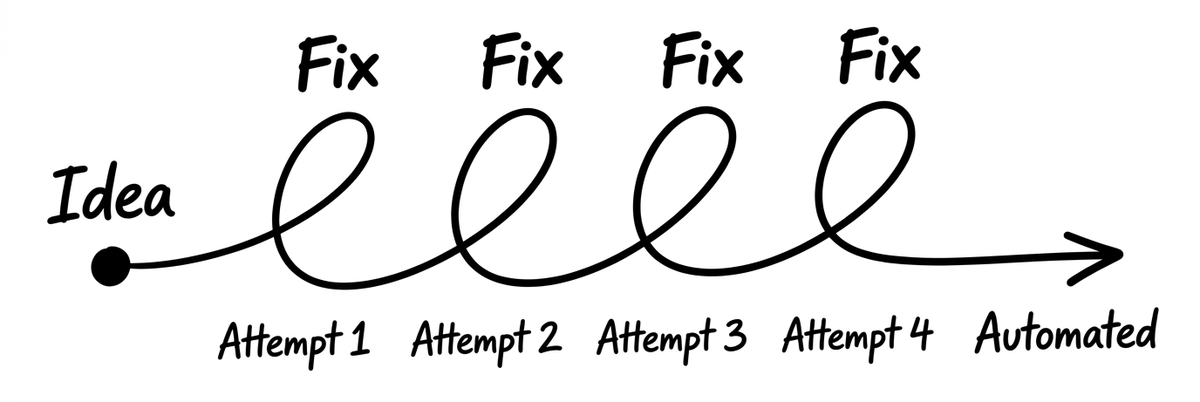
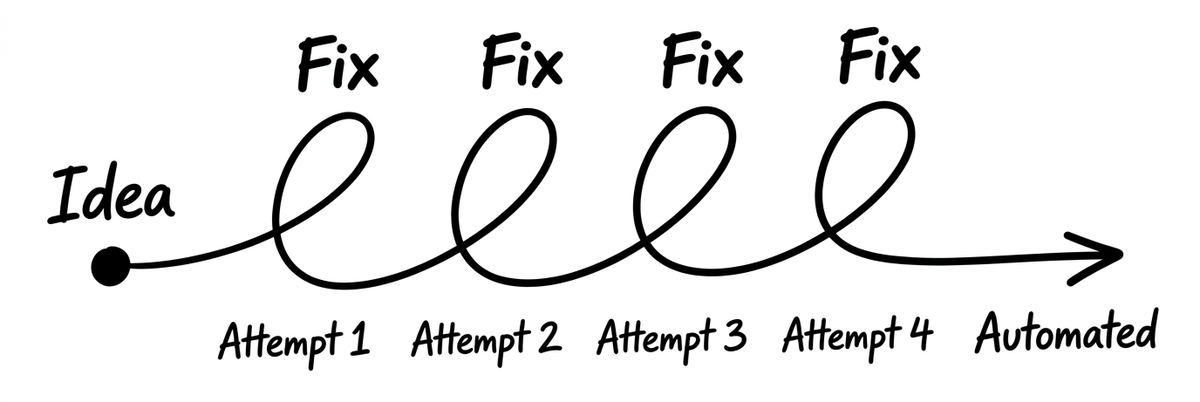
The math is simple: that 3-hour investment pays for itself after just 6 runs. After 20 runs, you've saved 7 hours. After 100 runs, you've saved 47 hours.
The ROI isn't theoretical. It's arithmetic.
Every hour invested in plugin setup compounds into saved time on every future run.
This philosophy connects all eight best practices.
Don't over-constrain (Rule 1) because you took the time to test what Claude actually needs. Set the personality (Rule 2) because you spent an hour getting the tone right instead of accepting the default. Nail the onboarding (Rule 3) because you watched real users struggle and fixed the friction points.
The people building the best AI workflows aren't the fastest. They're the most thorough. They read the persona doc before writing copy. They test the full workflow before shipping it. They build checkpoints that slow users down on purpose, because they know that slow setup creates fast execution.
And every run after setup proves it.