

TLDR:
- Claude Cowork Projects bundle tasks, files, instructions, and memory into persistent workspaces that survive between sessions
- Multi-folder support lets teams share a company context folder while each person maintains their own workflow folder
- Project-scoped memory means Claude gets smarter within each project over time, without bleeding context between projects
- Two layers of instructions give team leads shared standards while individuals customize their own workflows
- Scheduled tasks inside projects inherit full project context, making recurring work smarter over time
- You don't need thousands of employees to benefit. Even a two-person team gets a massive upgrade from this architecture
Your AI just got a promotion.
Claude Cowork Projects turn what was a session-based tool into a persistent, intelligent workspace. For anyone working with even one other person, multi-folder architecture solves the problem that's been killing team AI adoption: shared context without sacrificing individual control.
This article breaks down six capabilities that make Projects the most important upgrade Cowork has shipped. You'll see exactly how to structure a team deployment using multi-folder Projects. And you'll understand why this matters whether you're a two-person partnership or a 50-person marketing department.
The Problem Projects Actually Solve
Before Projects, every Cowork session was essentially amnesiac. Claude could read your folder and execute tasks. But it had no idea what happened last Tuesday.
For solo operators, this was manageable (annoying, but manageable). You could re-explain context or rely on well-structured files to carry the load.
For teams, it was a dealbreaker. Here's why.
If you wanted your whole team using Claude with shared business context (brand voice, customer personas, product details), you had two options. Neither was good.
Option A: Duplicate everything. Copy the company's brand voice file, persona docs, and product specs into every team member's folder. Now you have six copies of your persona document.
Someone updates the original. Nobody updates the copies. Within a week, three people's AI is working off outdated personas. (The IT version of the telephone game, except nobody's laughing.)
Option B: One giant folder. Cram everybody into a single shared folder. The company context is shared, but so is everything else.
No personalization. No individual workflows. No way for your email specialist to build skills that don't clutter things up for the social media person.
The result? Scattered adoption. Three people using Claude three different ways. No shared system, no standards, no consistency.
Projects fix all of this. And the fix is cleaner than you'd expect.
Six Capabilities That Make Projects Superior
Projects aren't just "folders with a label." They're a complete infrastructure layer with six capabilities that stack on top of each other. Each one is useful alone. Together, they turn Cowork from a powerful tool into a persistent operating system for your team.
| Before Projects | With Projects | |
|---|---|---|
| Memory | Starts fresh every session. You re-explain context every time. | Persists across tasks within a project. Claude remembers corrections, preferences, and past work. |
| Folder support | One folder per task. Company context or personal workflows, pick one. | Multiple folders per project. Mount a shared company folder AND a personal folder simultaneously. |
| Instructions | CLAUDE.md in your folder. One layer, one scope. | Two layers: Global instructions (all sessions) + Project instructions (per project). They stack. |
| Scheduling | Scheduled tasks float independently with no persistent context. | Scheduled tasks live inside projects and inherit context, instructions, and memory. |
| Organization | Flat list of tasks in a sidebar. Five workstreams, one jumble. | Each workstream gets its own project container with separate tasks, memory, and files. |
| Team deployment | Duplicate files into every folder or cram everyone into one. Neither works. | Shared company folder + individual folders. Consistency and autonomy at the same time. |
The Team Architecture: Multi-Folder Context
This is the headline feature.
Projects let you mount more than one folder as context. That sounds simple.
It changes everything for teams.
Here's the deployment model. Your company maintains a shared folder with the context every team member needs:
- Brand voice guidelines
- Customer personas
- Product and pricing docs
- Content rules and standards
- Approved workflows
Each team member also has their own personal folder:
- Individual skills they've built
- Personal routines and morning startup workflows
- Custom output templates
- Work-in-progress files
When a team member creates a Project, they mount both folders. Claude reads all of it. The company gets consistency across every output. The individual gets the freedom to work their way.
Nobody copies files. Nobody's AI is working from an outdated persona doc. And nobody has to sacrifice their personal workflows to get access to company context.
A marketing team of five could set this up in an afternoon. The email specialist, the social media manager, the content writer, the ad buyer, and the team lead.
Everyone's AI knows the same customers, speaks the same brand voice, and follows the same rules. But each person's AI also knows their specific role and runs their specific workflows.
Same playbook. Different positions.
Memory That Actually Persists
Before Projects, Cowork sessions were disposable. You started fresh every time.
With Projects, Claude remembers.
If you corrected Claude's tone in Task 3, it remembers that correction in Task 47. If you taught it that your CEO prefers "customers" over "users," that sticks. If it learned that your newsletter sign-off always includes a P.S., it doesn't forget next week.
Project memory is scoped, and that's the smart part. What Claude learns in your newsletter project stays in your newsletter project. It doesn't bleed into your sales page project or your client reporting project. (Think of it like separate brains for separate jobs.)
This is the difference between training a new intern every Monday and working with a colleague who's been on your team for months.
It also kills the "hand-off prompt" problem. You know the one. You start a new session and spend the first five minutes re-explaining everything Claude already knew yesterday.
With project memory, that ritual is dead.
Layered Instructions: Global Rules + Project Rules
Cowork now has two tiers of instructions, and they stack.
Global Instructions apply to every Cowork session, everywhere. Set these once in your settings. For a team, this is where you put the non-negotiables: "Never use em dashes. Always use our approved brand terminology. Follow AP style."
Project Instructions apply only within a specific project. This is where you get specific: "This project produces weekly newsletters. Always output in Beehiiv-ready format. Use a conversational tone. Include a P.S. section."
For a team lead, this architecture is a gift. You set the company-wide guardrails globally. Then each project carries its own specialized instructions that Claude follows automatically.
No more pasting the same rules into every conversation. No more hoping your team remembers to tell Claude about brand guidelines.
The instructions are baked into the infrastructure. Set it and forget it (the good version of that phrase).
Scheduled Tasks That Compound
Scheduled tasks existed before Projects. But they were disconnected, floating in space with no persistent context.
Now scheduled tasks live inside Projects. They inherit the project's context, instructions, and (critically) memory.
Think about what that means for recurring work:
- A daily content scan that remembers what it's already surfaced, so it doesn't flag the same Slack message twice
- A weekly competitive report that builds on the previous week's findings instead of starting from scratch
- A Monday morning briefing that knows your calendar patterns, your priorities, and what you were working on Friday
Recurring workflows get smarter over time because the project remembers. The tenth run is better than the first run. The fiftieth run is better than the tenth.
That's compounding. Your scheduled task isn't just running a job. It's learning a role.
Imported Chat Projects
If you've been using Claude in the browser (Claude Chat) to brainstorm strategy, develop ideas, or plan campaigns, Projects bridge that work into Cowork.
You can import an existing Claude Chat project into a Cowork project. Files, instructions, all of it. The strategic thinking you did in the browser now gets access to local file execution, scheduled tasks, plugins, and connectors.
It closes the gap between "thinking about it" and "doing it." Your planning conversations and your execution workspace finally live in the same place.
Organizational Structure
Before Projects, your Cowork sidebar was a flat list of tasks. If you were running five workstreams, it was a jumble.
With Projects, each workstream gets its own container. Newsletter production is one project. YouTube pipeline is another. Client A's work is a third.
Each project has its own tasks, memory, instructions, and files. When you're done with a project, archive it. It disappears from the interface without deleting any files on your computer.
Same information, radically different ability to find things and stay focused. It's the Marie Kondo of AI workspaces (and yes, it sparks joy).
How to Structure Projects for a Team
Here's the exact architecture. It's simpler than you'd think.
Step 1: Create a shared company folder.
This lives on a cloud drive (Google Drive, iCloud, Dropbox) so everyone can access it. It contains:
CLAUDE.md(company-wide instructions for Claude)core/persona.md(customer personas)core/brand-voice.md(voice guidelines)core/offers.md(products and pricing)core/content-rules.md(writing standards)workflows/(any shared workflows the team uses)
If you're using Growth OS, the Quick Start plugin builds this entire folder structure for you automatically. One session, done.
This is the single source of truth. One person maintains it. Everyone benefits.
Step 2: Each team member creates their personal folder.
This lives on their own machine or cloud drive. It contains:
- Their own
skills/(specialized skills they've built or installed) - Their own
routines/(morning startup, daily workflows) - Their own
outputs/(generated content, drafts, reports)
Step 3: Each team member creates a Project.
In Cowork, they create a new Project and mount both folders: the shared company folder AND their personal folder. They add project-level instructions specific to their workstream.
That's it. Three steps. Here's what it looks like on a shared drive:
Company Google Drive/
├── Company-Context/              ← Shared folder (managed by admin)
│   ├── CLAUDE.md                 ← Company-wide rules
│   ├── core/
│   │   ├── persona.md            ← Company personas
│   │   ├── brand-voice.md        ← Company voice
│   │   ├── offers.md             ← Company products
│   │   └── content-rules.md      ← Company style guide
│   └── workflows/                ← Company-approved workflows
│
├── Employee-A/                   ← Personal folder
│   ├── my-skills/
│   ├── my-routines/
│   └── my-outputs/
│
├── Employee-B/                   ← Personal folder
│   ├── my-skills/
│   ├── my-routines/
│   └── my-outputs/
Employee A creates a Project and mounts both Company-Context/ and Employee-A/. Employee B does the same with their folder. Both get the shared company context. Both keep their personal workflows separate.
Multi-Folder Team Architecture
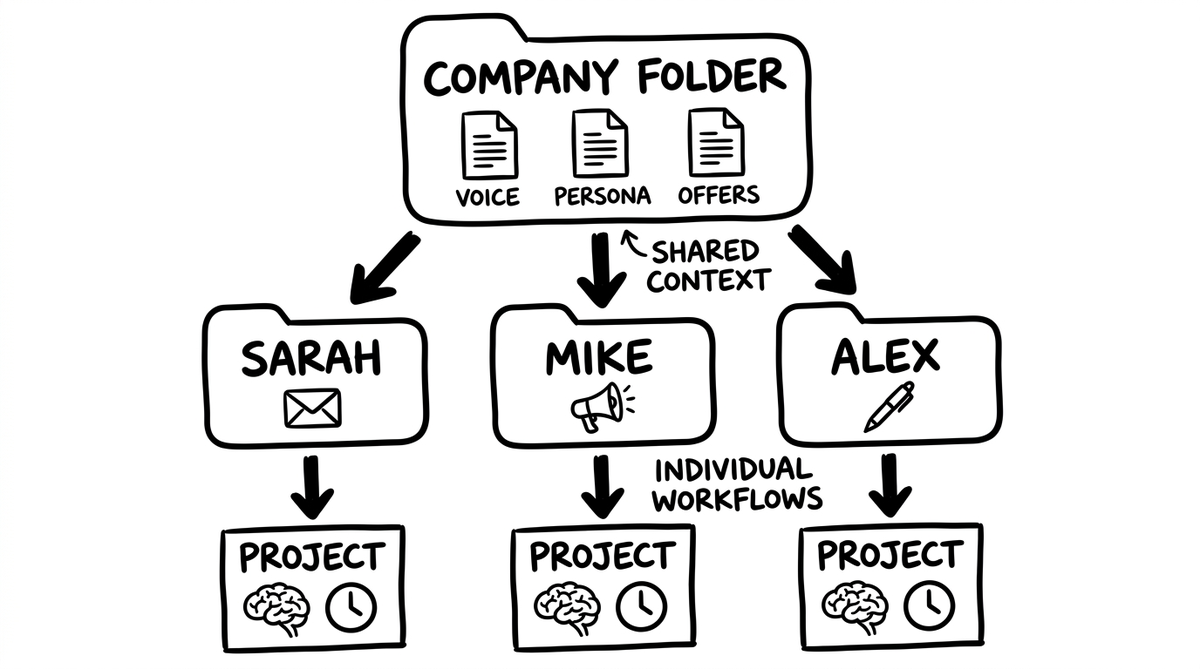
The power is in what happens next. When someone updates the persona document in the shared company folder, every team member's AI picks it up automatically on their next task. No Slack message asking everyone to "download the latest version." No version conflicts. No one running off outdated docs.
And when an individual team member builds a new skill or refines a workflow in their personal folder, it's theirs. It doesn't clutter the company folder or affect anyone else.
Autonomy and consistency. At the same time.
You Don't Need to Be a Big Company
When people hear "team deployment" and "shared infrastructure," they picture a Fortune 500 company with an IT department and a six-month rollout plan.
Forget that. This architecture works for tiny teams too.
A two-person partnership. You and a business partner. Shared company folder with your brand voice and offers. Personal folders with your preferred workflows.
Your AI stays aligned on the business basics. Your individual work styles stay independent.
A freelancer with three clients. Each client gets their own Project with its own folder, memory, and instructions. Your skill set carries across all of them.
Claude learns each client's preferences separately. It never mixes up Client A's tone with Client B's formatting quirks. (Your clients will think you have a photographic memory. You don't. Your Project does.)
A small agency with five people. Company folder has the agency's brand standards and processes. Each team member mounts it alongside their personal folder.
New hires get productive fast because the company context is already structured and waiting for them. Day one, their AI already knows how you do things.
A marketing team of ten at a mid-sized company. The marketing director maintains the company folder with approved personas, brand voice, and content rules. Each marketer builds their own skills for their channel (email, social, paid, content).
Scheduled tasks run inside each person's project, compounding knowledge over time. Ten people, one voice, zero copy-paste.
The threshold isn't company size.
It's whether more than one person (or more than one workstream) touches your AI. If the answer is yes, Projects give you shared context without shared chaos.
What to Watch Out For
Projects are powerful, but they're new. A few things to know:
- You share folders, not Projects. Each person creates their own Project locally. You can't export a Project and hand it to a teammate. What you share is the company folder, which each person mounts into their own Project.
- Your desktop must stay open for scheduled tasks. Cowork runs on your computer, not in the cloud. If you close the app or your machine goes to sleep, scheduled tasks pause. They'll resume when you're back, but they won't run at 3 AM on a sleeping laptop.
- Memory is local to each machine. If you switch computers, your project memory doesn't follow automatically. Mac users can sync via iCloud (Google Drive has issues with hidden folders that Claude creates). This is a solvable friction point, not a dealbreaker.
- No audit logging yet. If your organization needs compliance-grade activity tracking, Cowork's research preview doesn't offer that yet. Anthropic has signaled it's coming.
These are real limitations. They're also solvable ones. The architecture works now for the vast majority of teams, and it's only going to get tighter.
The Bigger Picture
Before Projects, Cowork was a powerful tool you picked up and put down. Each session started fresh. Context was manual. Organization was your problem.
With Projects, Cowork becomes a persistent workspace. It remembers. It follows instructions you set once. It compounds knowledge over time. It stays organized without you thinking about it.
For teams, the shift is even bigger.
This is the difference between "everyone experiments with AI individually" and "the team operates on shared AI infrastructure." One of those approaches scales. The other one produces three different brand voices on the same blog. (Ask me how I know.)
The multi-folder architecture means every team member's AI speaks the same language, knows the same customers, and follows the same rules. But each person still gets to work their way.
If you're new to Cowork, the free training walks through the fundamentals. If you're ready to build agent workflows inside your Projects, start with building your first AI agent workflow. And if you want your whole team on the same system, theCLICK's Teams training gets everyone set up on shared AI infrastructure that actually sticks.
Every team member's AI playing from the same sheet of music, while each one improvises their own part.
That's what Projects make possible.