

TLDR:
- Claude Cowork works inside actual folders on your computer. The files in those folders are the AI's entire world.
- The most important folder is your Core Folder: persona, offers, brand voice, business info, design guidelines, and content rules. These six documents give your AI ambient awareness of your entire business.
- Beyond core, you need routines (daily briefings), workflows (repeatable processes), and a CLAUDE.md file that wires everything together.
- The Growth OS Quick Start plugin builds this entire structure for you in one guided session. Seven steps, and your AI knows your business.
Here's something that surprises most people the first time they open Claude Cowork.
There's no magic portal. No special interface. You open a project, and Claude is sitting inside a folder on your computer. An actual folder. With actual files inside it.
That folder is Claude's entire world. Whatever files are in there, Claude can read. Whatever files aren't, Claude has no idea about. The structure of that folder, and the quality of the documents inside it, determines everything your AI can do for you.
Most people skip straight past folder structure and dive into prompting. That's like hiring a brilliant new employee, giving them zero onboarding documents, and wondering why their first month of work sounds like it was written by a stranger.
I'm going to walk you through the six documents that belong in your core folder and why each one matters. And at the end, I'll show you how to build the whole thing in about 20 minutes without starting from scratch.
Your AI Lives in a Folder
If your first experience with AI was ChatGPT, you learned a specific workflow: open a chat, type a question, get an answer. Close the tab. Open a new chat tomorrow. Start from scratch. Paste in context when you need it. Watch the AI forget everything the moment the conversation ends.
Claude Cowork works differently. When you create a project, you're creating a folder on your local machine. Inside that folder, you place files: markdown documents, configuration files, images, reference data. Claude reads all of it. Every time you start a new conversation inside that project, Claude already knows everything in the folder.
That's the fundamental shift. Your AI has a home now. And the quality of that home directly determines the quality of everything it produces.
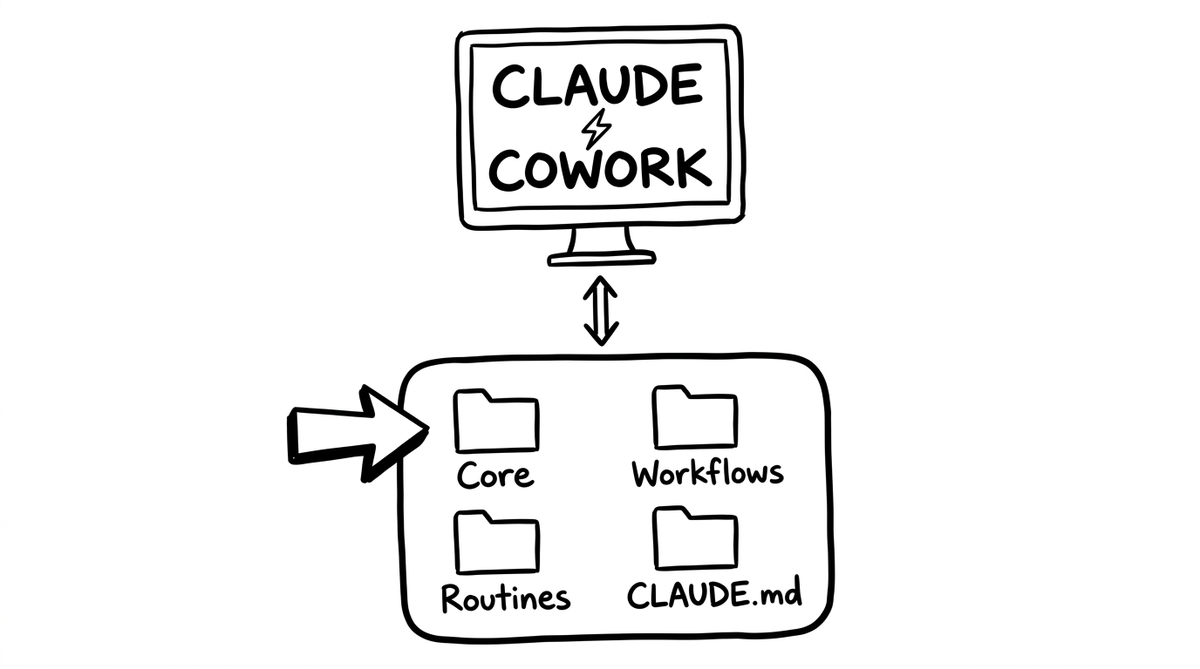
A folder full of random, unorganized files produces random, unfocused output. A folder with the right documents in the right structure produces output that sounds like it came from someone who actually works at your company. (Someone who paid attention during onboarding, at that.)
The Core Folder
The most important folder in your Claude Cowork workspace is one we call the Core Folder.
Core sits at the top level of your project. It contains the documents that tell your AI who you are, what you sell, who you serve, and how you communicate. Every conversation Claude has with you starts by loading from Core. Think of it as the shared memory layer that gets loaded before your AI does anything else.
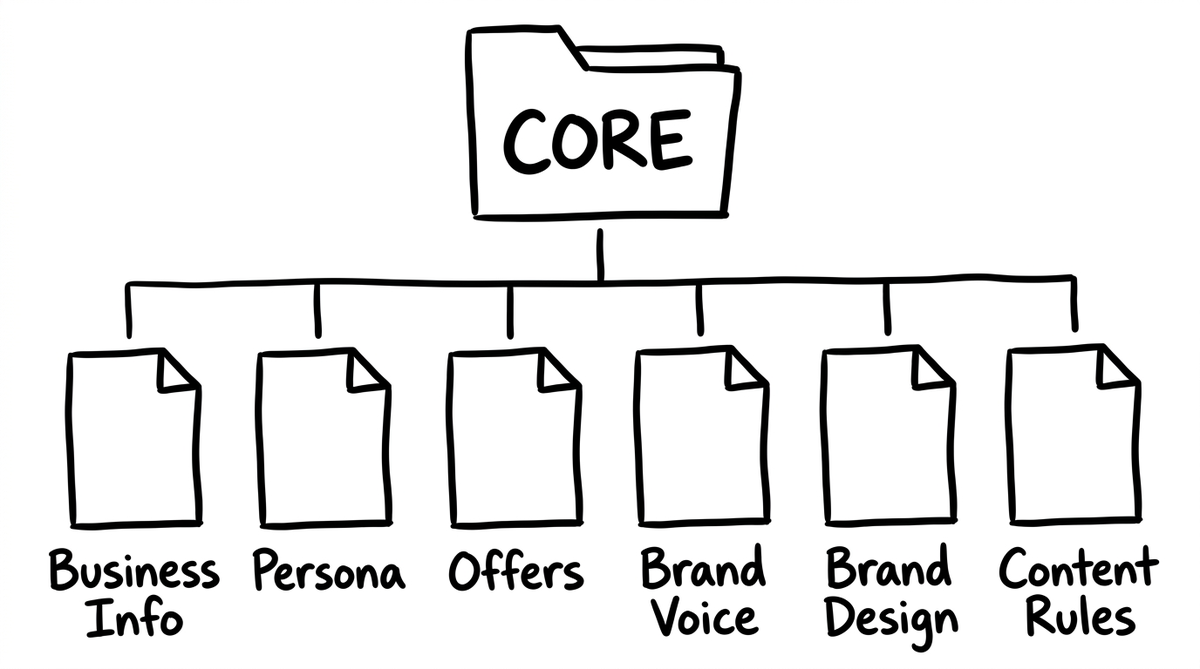
Six documents live inside Core. Each one exists for a specific reason, and together they give your AI what I call ambient awareness: it just knows your business, without being told.
Persona
This tells your AI who your customer is. Not just demographics. Goals, frustrations, and the actual language your customers use to describe their problems.
When your AI has a persona file, it stops writing generic copy aimed at "business owners" and starts writing to a specific person with specific struggles. Every ad, email, and landing page gets sharper because the AI knows exactly who it's talking to. Feed it customer reviews, testimonials, and support tickets, and you'll start seeing your customers' own words reflected in the copy. That's when output starts converting instead of just existing.
Offers
What you sell, who it's for, what it costs, and what makes it different. When this file exists, your AI can reference your actual products in every piece of content it creates. No more "[insert product name here]." No more generic benefit statements that could apply to any company. The AI knows the lineup and writes about it accurately.
Update your pricing? Change it in the offers file once. Everything downstream reflects it automatically.
Brand Voice
How you sound. Vocabulary preferences, sentence patterns, things you never say, and a before/after example showing the difference between default AI output and your actual voice.
This is the file that stops your AI from sounding like everyone else's. Without a voice file, Claude defaults to competent but bland. With it, the output sounds like you wrote it. (Or at least like someone who talked to you for an hour before sitting down to write.)
Business Info
What your business does, your mission, your channels, your team, your tech stack. This gives the AI strategic context. When Claude knows you're a three-person team running on Shopify with a 5,000-person email list, it suggests very different things than it would for a 50-person company on Salesforce.
Brand Design
Colors, typography, layout rules. When you ask Claude to produce HTML, build a landing page, or create visual assets, this file makes sure everything matches your actual brand instead of defaulting to generic templates.
Content Rules
The guardrails. "Never fabricate statistics." "Always verify links before including them." "Use this formatting convention." Rules that apply to everything the AI writes, regardless of the task. Set them once, enforce them on every piece of output automatically.
Six documents. Each one makes the AI meaningfully better at its job. And because Claude loads from the same Core Folder on every conversation, your AI is always working from a consistent, current picture of your business.
The real power is one source of truth. Change something in Core once, and every piece of output from that point forward reflects the update. No meetings, no email threads, no "wait, are we still using the old pricing?"
Beyond Core: Routines, Workflows, and CLAUDE.md
The Core Folder is the foundation. But a complete Claude Cowork workspace has three more pieces worth understanding.
Routines
Routines are processes your AI runs on a trigger. The most important one is a morning routine: say "good morning" and Claude pulls up your calendar, checks your tasks, surfaces relevant news, and suggests what to work on today. Like having a chief of staff who read through everything before you sat down.
Routines live in a routines/ folder. Each one is a markdown file with step-by-step instructions that Claude follows when triggered.
Workflows
Workflows are repeatable business processes. Writing a weekly newsletter. Creating LinkedIn posts from a webinar transcript. Running a content research pipeline. Each workflow has its own folder with detailed instructions (called skills) that tell Claude exactly how to execute the process.
Core is what the AI knows. Workflows are what the AI does.
CLAUDE.md
This is the master instruction file. It sits at the root of your workspace, and Claude reads it at the start of every single conversation. It's the wiring diagram: where the core files live, what routines are available, what workflows exist, what triggers fire which processes.
CLAUDE.md is the file that turns a collection of folders and documents into a coherent system. Without it, Claude would have to rediscover your folder structure every session. With it, Claude boots up knowing exactly where everything is and what to do with it.
Why We Built the Quick Start Plugin
Persona files. Offer documents. Voice guides. Routines. Workflows. CLAUDE.md. That's a lot of structure to build from scratch. If you sat down and did it manually, you'd spend a full day on it (minimum) and probably miss half the connections between documents.
That's exactly why we built the Growth OS Quick Start plugin.
The Quick Start is a seven-step guided setup that builds your entire workspace structure in one session. Claude interviews you about your business, crawls your website, processes whatever assets you share, and produces everything you need to go from a blank project to a fully structured AI workspace.
The whole thing takes about 20 minutes. You answer questions, share assets, and approve drafts as Claude builds each piece. By the end, your Claude Cowork project has the exact folder structure it needs to produce useful, on-brand, business-specific output from the very first conversation.
No more blank-slate AI. No more pasting the same context into every chat. No more output that sounds like it was written for a business the AI has never met.
Your AI lives in a folder. The Quick Start plugin makes it a good one.