

Beehiiv MCP
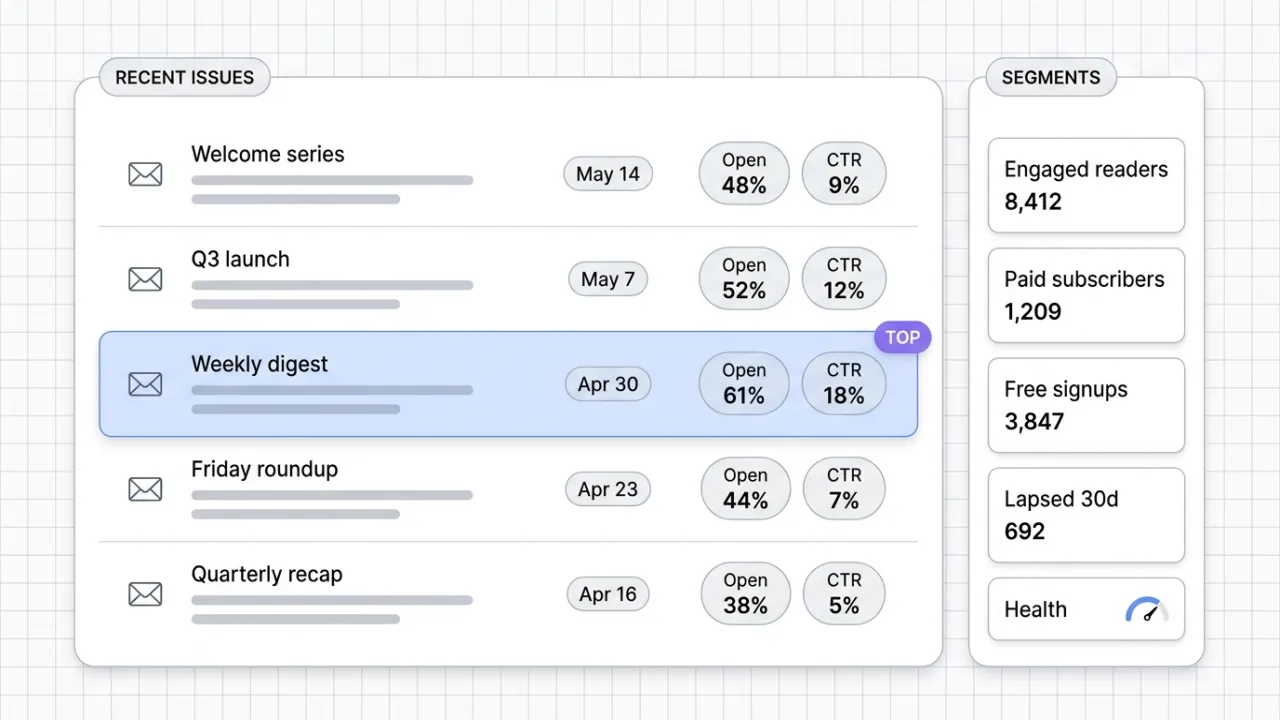
Beehiiv's official MCP connects Claude to your newsletter publication. Query subscriber data, post performance, segment health, and site SEO from inside the Claude conversation. v1 is read-mostly with write coming in later releases.
Install Beehiiv MCP and Claude can:
- → Query open rates, click rates, and engagement across every issue from Claude
- → Analyze subscriber segments and surface which audiences respond to which content
- → Audit site SEO patterns across past posts to inform new content angles
- → Create segments via plain-language prompts to prepare a send list
Beehiiv maintains it. It is free. One install, then Claude has hands on the open web.
What you can do once it is installed
Ask Claude to pull last quarter's open rates and click rates across every issue and identify the topics that outperformed. Have it surface which segments are most engaged with your launch content. Search for the SEO patterns across your past 50 posts. Query subscriber counts for a campaign segment before you schedule a send. Build a content brief grounded in what your actual readers responded to. The newsletter analytics layer that used to live in beehiiv's dashboard now feeds the Claude conversation where the next issue is being planned.
Add Beehiiv MCP as a custom connector
Open Claude Cowork. Choose Customize, then Connectors, then click the + next to Connectors. Paste these two values into the Add custom connector modal:
Name
beehiiv Remote MCP server URL
https://mcp.beehiiv.com/mcp Beehiiv handles OAuth in your browser after you click Add. Sign in to your beehiiv account and grant access to the publication you want Claude to query. Available on every beehiiv plan with no upgrade required.
First time installing an MCP in Cowork? Full walkthroughPrefer Claude Code or want the source?
Claude Code install
Starter prompts
Copy any of these into Claude after you install Beehiiv MCP to see it in action. Each prompt is generic enough to work in any workspace.
Last 90 days performance pulse
Pull open rates and click rates for every newsletter issue I sent in the last 90 days. Identify the top three performers and the bottom three. Surface what the top performers have in common (subject line patterns, topic, send day, length) and what the bottom three may share.
Segment health snapshot
List every subscriber segment in my publication with its current size. Flag any segment that has changed by more than 20 percent in the last 90 days. For the largest engaged segment, suggest two content angles that would land based on what they have responded to in the past.
Content refresh candidates from the archive
Audit my last 30 published posts. Identify the five pulling the most organic search traffic, the five that have decayed since publish, and three topics I have not yet covered that appear in my audience's engagement signals. Recommend the next 3 issues to write and why.
What this MCP does
An MCP (Model Context Protocol server) is a packaged add-on that gives Claude new abilities. Install one and Claude can use it from then on. Beehiiv MCP is beehiiv's official hosted server at mcp.beehiiv.com that gives Claude OAuth-scoped access to your beehiiv publication. The v1 tool surface is read-mostly: content analysis and post performance metrics, subscriber data and segmentation analysis, podcast episode analytics, automation performance monitoring, site SEO auditing, and access to custom subscriber fields. The one write capability today is segment creation from a plain-language prompt. Draft and send for newsletter issues, revenue and ad reporting, and Stripe billing data are not yet exposed. Authorization is per-user OAuth, scoped to publications your beehiiv account can already access. Available on every beehiiv plan, no upgrade required. Newsletter operators use it for performance analysis, segmentation, and content planning grounded in actual subscriber behavior.
The four jobs it does best:
Pull post performance across your publication
Beehiiv MCP surfaces open rates, click rates, and engagement signals across recent issues so you can identify which topics and headlines outperformed, spot drop-off patterns, and ground next-issue planning in actual numbers rather than memory.
Subscriber data and segmentation
Query subscriber counts by segment, custom fields, and engagement state. Identify which audiences are most engaged with launch content, which are lapsing, and which segments warrant new content angles.
Site SEO auditing across published posts
Surface the SEO patterns across your past posts. Find which posts are pulling organic traffic, which need refresh, and where content gaps exist relative to your audience's actual search behavior.
Plain-language segment creation
The one write capability in v1: describe the segment you need (engaged readers in the last 90 days, paid subscribers from a specific campaign, free signups who never opened) and beehiiv builds it. Future segments don't require clicking through filters.
Who it is for
- • Solo creators and operators publishing on beehiiv: the analytics layer that used to mean tab-switching to the beehiiv dashboard now feeds the conversation where you plan and write. Performance data lives next to the brief.
- • Marketing teams running a newsletter as a channel: the unlock for grounding content decisions in actual subscriber behavior. Which segments engaged with the launch series, which posts pulled organic traffic, which audiences are lapsing.
- • Agency operators managing client newsletters: per-publication OAuth scoping means you can hop between client publications cleanly. Useful for assembling monthly performance reports without exporting CSVs.
- • Skip if: your newsletter is on a different platform (Kit, Mailchimp, ConvertKit, Substack). The beehiiv MCP is publication-specific. Wait for the platform you actually use to ship its own MCP.
Ways marketers and operators use Beehiiv MCP
16 ways the same tool shows up across content, research, lead gen, and quality assurance work.
Performance analysis and reporting
- • Pull open and click rates for the last 90 days and identify top and bottom performers
- • Generate a quarterly newsletter performance report grouped by content category
- • Identify which subject line patterns correlate with above-average open rates
- • Surface engagement trends by send time, day of week, or post length
Segmentation and audience health
- • Build a segment of engaged readers from the last 30 days for a launch announcement
- • Query the size of the paid subscriber segment before pricing a new tier
- • Identify lapsed subscribers who have not opened in 60 days for a re-engagement series
- • Surface custom subscriber fields to filter audiences by company, role, or signup source
Content planning grounded in data
- • Generate next-issue topic ideas based on what past content drove engagement
- • Identify content categories that are declining in performance and need a refresh
- • Pull the SEO performance of past posts to inform new angles and headline patterns
- • Cross-reference subscriber segments with content topics to find unserved audience needs
Site SEO and organic growth
- • Audit which past posts are pulling organic traffic and which are dormant
- • Surface SEO gaps relative to topics your audience is actively searching
- • Identify post titles and meta patterns that correlate with higher search performance
- • Find duplicate or thin-content posts that need consolidation or refresh
For teams running this at scale
Publications running thousands of automation events per day or multi-publication newsroom setups will outgrow the read-mostly v1 scope. For those, beehiiv's REST API and webhook surface still cover the high-volume cases. The MCP is the right call for editor-driven analysis, content planning, and segmentation work where Claude is the consumer of context and the writer of human-paced outputs.
We run beehiiv as theCLICK's newsletter platform across every issue, which is why this review is hands-on rather than theoretical. The official MCP v1 is mostly read-side, so concrete weekly use means pulling open rates and CTR for the last 8 issues to pick next week's lead topic, querying which segments engaged with launch content, and auditing SEO patterns across past posts to find refresh candidates. Draft and send capabilities are on the roadmap; for now, content production stays in beehiiv's web app while Claude handles analysis, segmentation, and planning. Current as of May 2026.
More in the library
Other entries that share a category with this one. Editorial picks from theCLICK.

Klaviyo MCP
Klaviyo's official MCP plugs Claude into your ecommerce lifecycle marketing. Build flows, write campaigns, segment audiences, query revenue, and manage subscribers without opening another tab.

Canva MCP
Canva's official MCP connects Claude to your design workspace. Generate, search, edit, resize, and export designs across formats, with brand kit and autofill capabilities for Enterprise teams.

ClickUp MCP
ClickUp's official MCP connects Claude to your workspace. Create and update tasks, run time tracking, summarize comment threads, and orchestrate project ops from inside the conversation.

The Ecommerce Stack for Claude
Fourteen connectors that take an ecommerce brand from ad creative to checkout to support to retention, with install paths for Claude Cowork and Claude Code side by side.
STAY IN THE LIBRARY LOOP
Get the next library entry first
We review new plugins, MCPs, skills, and CLIs as they ship. Subscribe and you'll get a short heads-up the next time we add one to the library, plus theCLICK's weekly AI marketing brief.
This library is operated by theCLICK (Modern Publisher, LLC)